
01Area of interest
The area you draw on the map, or one you saved earlier. Its size in km² is what the estimate is calculated on, so the boundary is a pricing decision as much as a mapping one.
Tasking
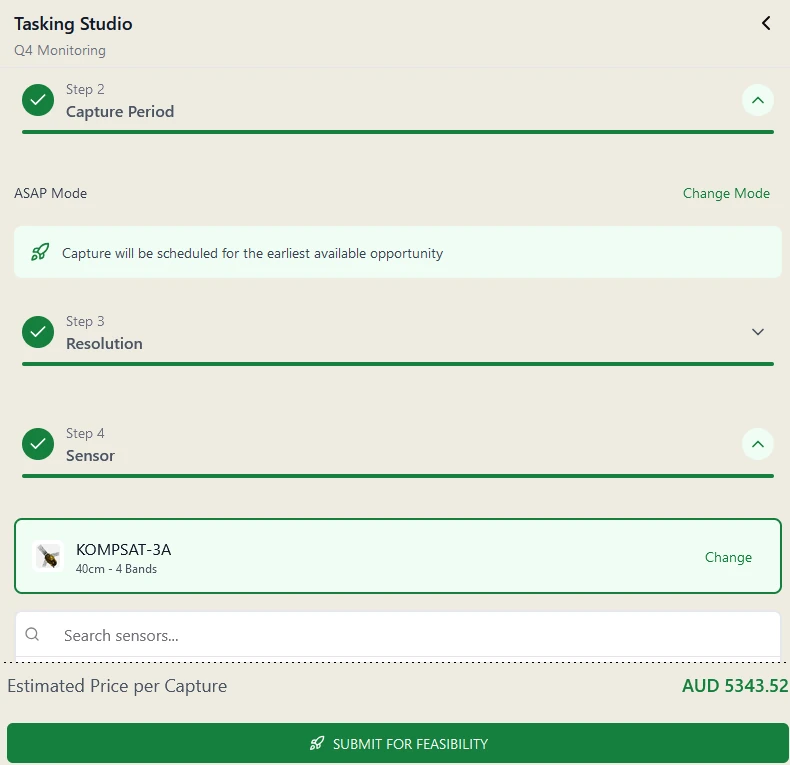
When nothing in the archive is recent enough over your site, Tasking Studio scopes a new collection: the area, the window, the resolution, and the sensor. The estimated price is on screen before you submit.
The area you draw on the map, or one you saved earlier. Its size in km² is what the estimate is calculated on, so the boundary is a pricing decision as much as a mapping one.
ASAP hands the order to the earliest available opportunity. Specific dates hold it inside a window you set, which is what a reporting deadline or a seasonal comparison usually needs.
Chosen inside the order rather than through a separate quote. The rate card lists tasking rates from 30 cm to 75 cm, with a revisit interval against each one. Coarser resolutions are archive only.
Pick from the sensors that can take the order at that resolution. The catalogue is searchable inside the studio, and each sensor has a specification page on our site.
Cost structure
Tasking is priced per km² of the area you draw, not per capture. The number of scenes a satellite needs to cover that area does not change the total, and the estimate is on screen before the order is submitted.
Rates step down as the area grows. The published rate card lists tasking rates by resolution in AUD, USD, and EUR, and the full processing chain is inside that rate rather than billed on top of it.
Submitting sends the order for a feasibility check before any satellite is committed to it. The order sits at that status in your list until it clears.
A tasking order can be set to repeat on an interval, which is how monitoring over a fixed site is usually run rather than as a string of one-off orders.
Covering the same regions repeatedly, or a lot of ground at once? Talk to us about a committed per-km² rate before you order.
How tasking differs from archive, what drives the price, and how to plan a capture window that clears feasibility: the explainer covers the mechanics before you order.
Get started
Draw the area in Tasking Studio to see the estimate, or talk to us about a window that has to be met.